Source-backed comparison guide

How should you compare portfolio trackers?

Start with the account model, then compare asset coverage, automation and business model. The best tracker is the one whose tradeoffs match how you actually hold wealth.

View the comparison Last verified July 12, 2026
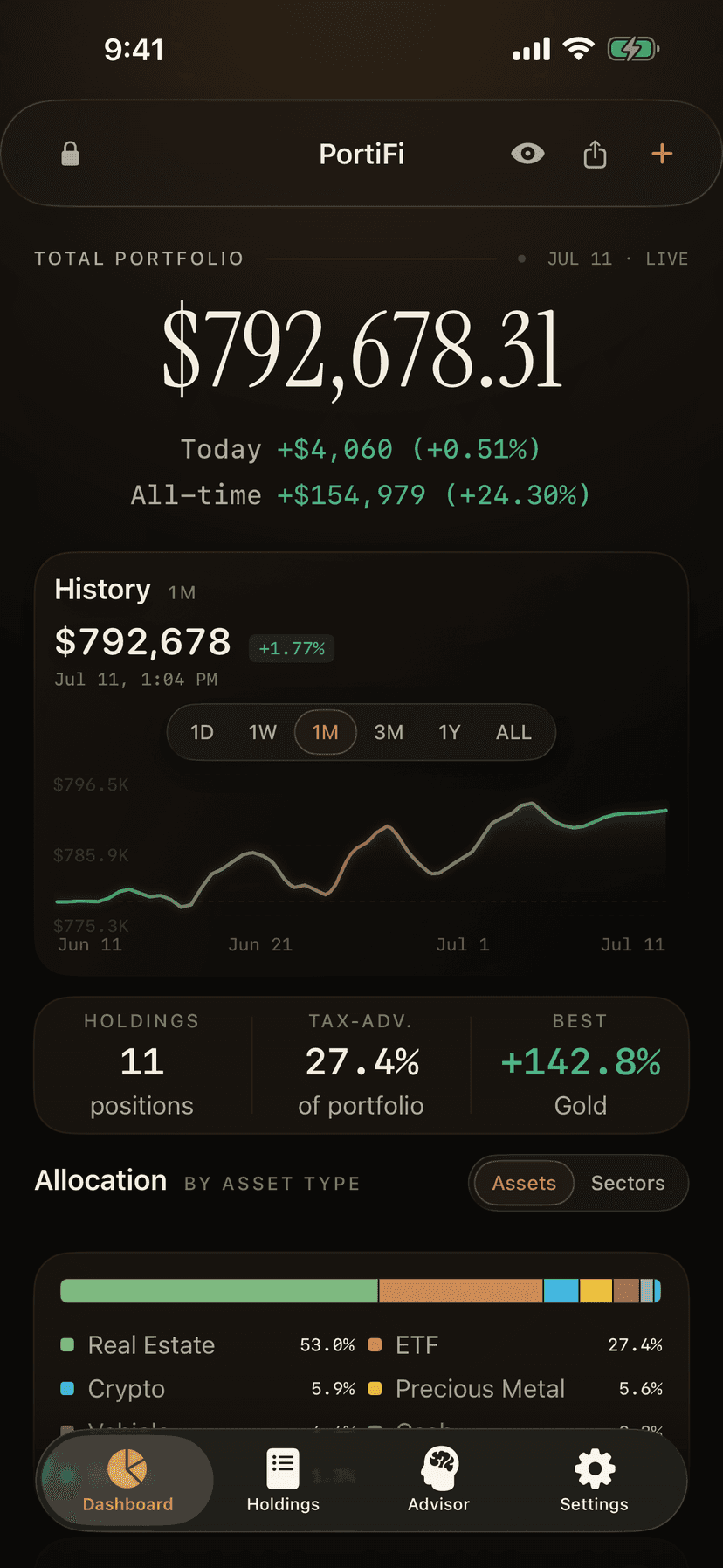
PortiFi dashboard showing a private net worth number across multiple asset classes
Decision lensPrivacy first, automation first, or reporting first?

Six products compared from official product and help pages.

Quick answer

No portfolio tracker wins every tradeoff.

Choose a manual-first tracker when minimizing account connections and covering unusual assets matters most. Choose a connection-first tracker when automatic balances and transactions matter more. Choose a reporting-first tracker when tax, dividend and performance calculations are the primary job.

Privacy firstPortiFi
Automation firstMonarch or Kubera
Reporting firstSharesight

Product comparison

Compare the operating model, not just the feature list.

Product capabilities change. Every row links to the official page used for verification.

ProductHow data gets inCoverage and tradeoffBest fit

How data gets inManual-first entries, screenshot and scan workflows, plus read-only public wallet lookup. Bank or brokerage credentials are not required.

CoverageStocks, ETFs, crypto, real estate, vehicles, collectibles, cash, debt, metals and retirement assets.

TradeoffMore user control and broad manual coverage, with less automatic account syncing.

Best fitInvestors who prioritize privacy and need one view across market and real-world assets.
How data gets inConnection-first aggregation across financial accounts, with automatic tracking and integrated planning tools.

CoverageBank accounts, investments, credit cards, loans, real estate and other household financial accounts.

TradeoffStrong automation and budgeting context, but the core experience is built around connected accounts.

Best fitHouseholds that want budgeting, transactions and net worth automation together.

How data gets inInstitution connections, public wallet connections, ticker tracking, AI import and manual asset support.

CoverageStocks, crypto, real estate, private equity, art, vehicles, jewelry, watches and other alternatives.

TradeoffDeep coverage and automation for complex wealth, at a materially higher annual price than consumer trackers.

Best fitComplex or high-value portfolios that need broad connectivity and family-office-style reporting.

How data gets inBroker connections, spreadsheet uploads and manual entry, with automatic corporate-action processing.

CoverageGlobal stocks, ETFs, funds, cash, currencies, property and manually valued alternatives.

TradeoffDeeper performance and tax reporting, while real-world assets generally require custom manual tracking.

Best fitInvestors who care most about investment performance, dividends and tax reporting.

How data gets inRead-only wallet, exchange and broker connections, with CSV import and manual transactions.

CoverageStocks, crypto, ETFs, funds and other supported market assets across multiple platforms.

TradeoffStrong market-asset tracking and automation, with less emphasis on a complete household balance sheet.

Best fitActive investors who want connected stock and crypto performance in one place.

How data gets inConnected financial accounts supply the main dashboard and its automatic financial picture.

CoverageInvestments, cash, credit, loans, net worth, budgeting and retirement-planning tools.

TradeoffA capable connected dashboard and planning suite that also supports Empower financial services.

Best fitUsers who want a connected dashboard with retirement and planning tools.

Methodology

What we checked, and what we did not assume.

We reviewed official product, feature, security and help pages available on July 12, 2026. We compared account model, documented asset coverage and automation, then stated our best-fit interpretation. We did not test every paid tier, score security implementations, or treat marketing claims as independent performance evidence.

  • Official sources are linked in every row.
  • PortiFi is evaluated with an explicit manual-work tradeoff.
  • Competitor claims are descriptive, not ranked or exaggerated.
  • The guide is reviewed when product terms materially change.

Published by Cold Start Software LLC, the developer of PortiFi. No competitor paid for inclusion.

The privacy decision

“Read-only” and “no login required” are different promises.

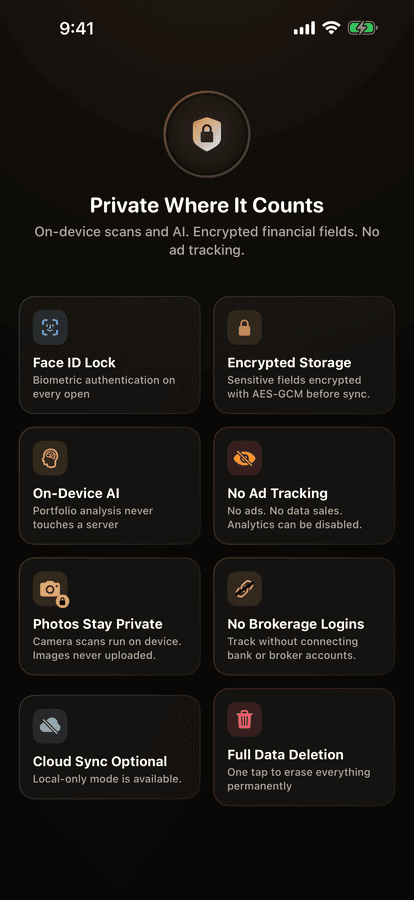
A read-only connection can prevent a tracker from moving money while still transmitting account balances and transaction data. A no-login workflow avoids connecting those financial accounts in the first place, but usually requires more manual upkeep. Decide which boundary matters to you.

PortiFi privacy controls for on-device scans, encrypted storage, and optional connections
Ask before choosingWho receives the data?Can the app work without a connection?Can you export and delete your records?

Common questions

Direct answers for the final decision.

Which portfolio tracker works without bank or brokerage logins?

PortiFi is designed to remain useful without bank or brokerage credentials. Users can add assets manually, use screenshot and scan workflows, and look up supported public wallet addresses in read-only mode.

Are connected portfolio trackers unsafe?

Not inherently. Reputable connected trackers generally use aggregators, OAuth, or read-only connections. The practical decision is whether the automation benefit is worth sharing additional financial-account data with the services involved.

Which tracker has the broadest asset coverage?

Kubera documents especially broad connected and alternative-asset coverage. PortiFi emphasizes flexible manual coverage without requiring financial-account connections. The best choice depends on whether automation or credential-minimizing control matters more.

Manual-first by design

See what PortiFi tracks.

Start free, without connecting a bank or brokerage account.

Download PortiFi